How to Log In to Cooleaf
Whether you're using a web browser or the Cooleaf mobile app, this guide will help you log in successfully. Follow the steps below based on how you access your Cooleaf account:
🔐 Logging in via Web Browser – Managed Password
Navigate to your Cooleaf account via a web browser
On the Welcome to Cooleaf screen, enter your email address and password.
Click Log In.
✅ Important Notes: Make sure you are using the correct email address tied to your Cooleaf account. For example,
Correct:
john.cooleaf.123@cooleaf.comNot Correct:
john@cooleaf.com(this may be an alias and won’t work)If you're unsure of your login email, check with your organization’s HR or IT team.
🌐 Logging in via Web Browser – Single Sign-On (SSO)
Some organizations use SSO to simplify login. If your company uses SSO:
Go to your Cooleaf login page.
Enter your work email address.
-
You will be automatically redirected to your organization’s login page.
This may look like a Google, Microsoft, or a custom login screen used by your company.
Follow the on-screen steps to log in.
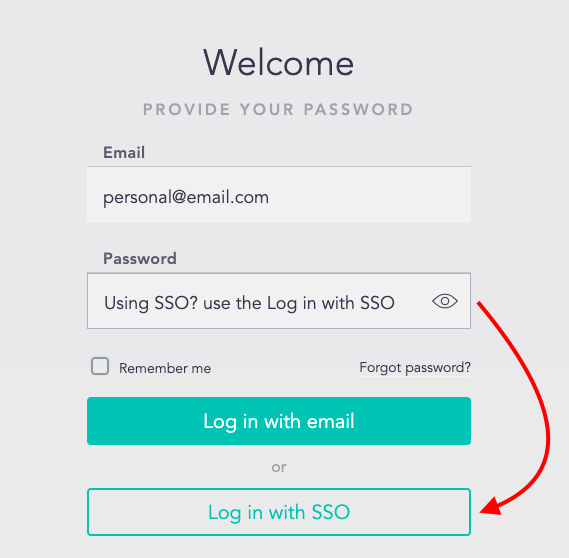
🧭 Dual Login:
If your organization offers both standard and SSO login, you’ll see options:
Enter your email to use the standard login.
Or click “Log in with SSO” to use your organization’s credentials.
🧾 Logging in via Web Browser – Employee ID Login
Some organizations have Cooleaf set up so that users log in using an Employee ID instead of an email address.
To log in using your Employee ID:
Go to your Cooleaf login page.
On the Welcome to Cooleaf screen, enter your Employee ID and password.
- Click Log In.
✅ Important Notes: Make sure you are entering your complete and correct Employee ID. If your ID includes leading zeros (e.g.,
001234), include those as well.
📱 Logging in via the Cooleaf Mobile App
Open the Cooleaf mobile app.
-
Enter your email address, select Next.
- Or select Log in with Employee ID.
-
Follow the on-screen steps to complete the login process.
This might include entering a password, using SSO, or verifying your email.
💡 Pro Tip: Make sure your app is updated to the latest version for the smoothest experience.
🛠️ Trouble Logging In?
No worries—we’ve got you! Check out our full Troubleshooting Login Issues article for steps on:
Resetting your password
Fixing common login errors
Who to contact for more help